See where the power goes.
Battery level, health, cycles, temperature, and power flow. A useful snapshot, right in your menu bar.
One glance. A clearer picture. Coddle.
Keep your battery in balance and your work moving. Thoughtful charging and sleep controls, quietly at home in your menu bar.
Free & open source · macOS · No account needed
Coddle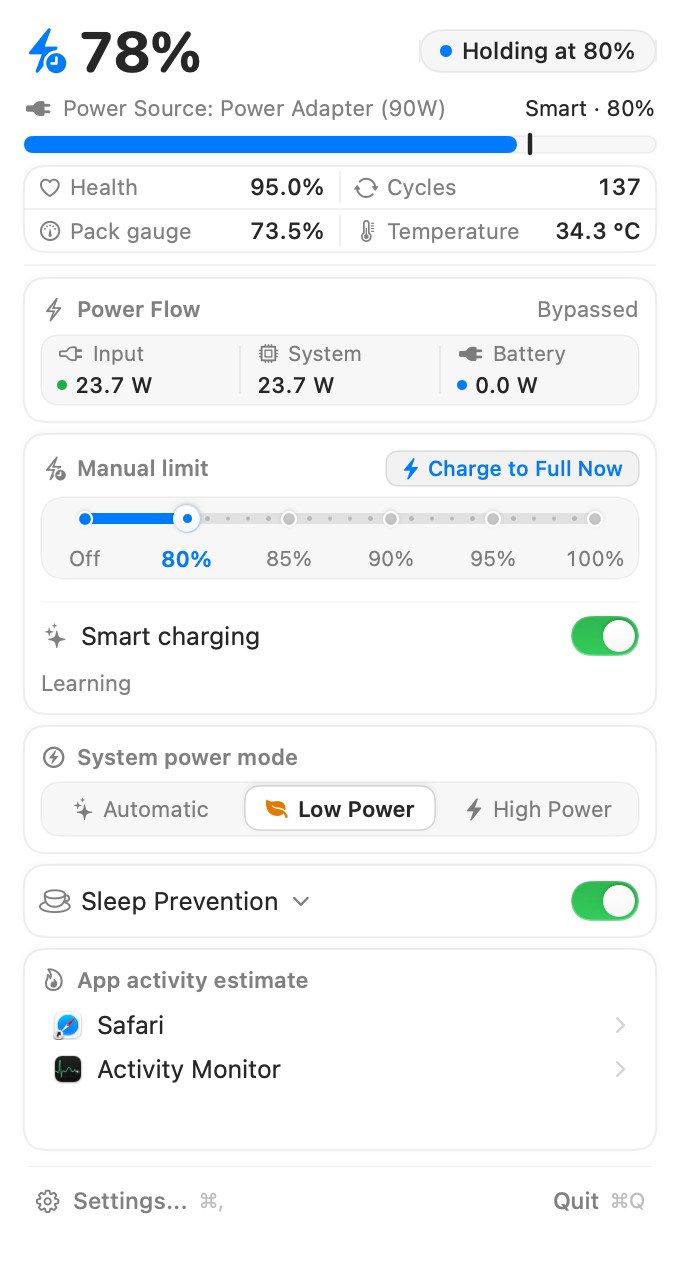
01 / FIND YOUR BALANCE
At your desk, on the move, or deep in a long-running task. Give your Mac a plan that fits.
Choose an 80–100% charge limit on supported Macs. Keep a little headroom while you stay plugged in.
Illustration only. These controls do not change your Mac.
02 / QUIETLY CAPABLE
Battery level, health, cycles, temperature, and power flow. A useful snapshot, right in your menu bar.
One glance. A clearer picture.Smart charging uses your local plug-in history to estimate when you might unplug, holding a limit and allowing a top-up beforehand.
Simple rules. No cloud model.Keep your Mac awake for a build, export, or agent run. Choose separately whether the display stays on or the lid can close.
Closed-lid use needs the optional helper.Charging history and preferences stay on your device. No account, no subscription. Six app languages, two appearances, and controls you can always change.
03 / A FEW GOOD QUESTIONS
A small app should be easy to understand. Here are the details before you get started.
The Universal app is built for Apple Silicon and Intel, targeting macOS 13 or later. Charging control depends on the capabilities available on your Mac and macOS version, which Coddle checks at runtime. Current real-device validation covers recent macOS on Apple Silicon; Intel and older macOS runtime validation remain open.
It is an early preview, free to download. The app is ad-hoc signed, not Developer ID signed or notarized by Apple. macOS may prevent it from opening normally. Review the installation notes and source before deciding to use it.
Charging control and ordinary sleep prevention do not need the privileged helper. Keeping your Mac awake with its lid closed requires the optional helper, installed only when you choose it and approve the macOS administrator prompt. Some system power-mode changes also require authorization.
Coddle stops its Mac, display, and lid-closed sleep prevention, while remembering your display and lid preferences for next time. Charging settings and the system display timeout stay as you set them. If stopping cannot be confirmed, the app shows that state and retries.
It uses local hourly plug-in samples and straightforward rules, not an online AI model. It needs enough observations to recognize a routine, and its estimates are not guaranteed. Configuration and charging history are stored locally on your Mac.
Yes. Coddle is available under MIT or Apache-2.0. Download the source snapshot alongside the preview to inspect it or build it yourself. Get the source ↗
A LITTLE CARE STARTS HERE.
A calmer corner of your menu bar. Try Coddle for Mac.
Download the previewNot notarized by Apple. Charge control varies by Mac and macOS.